- September 03, 2025
Summarize with AI
Not enough time? Get the key points instantly.
Get summary:
Why Choosing the Right LLM is Hard Decision?
You're building an AI feature into your product. Your team is evaluating LLMs, and the conversation splits into two camps: "Use GPT, everyone else does" versus "Run Llama locally, it's free."
Everyone has opinions. Your CTO wants Claude because "it's safer." Your lead developer wants GPT because "the API is easy." Your DevOps engineer wants Ollama because "we control the infrastructure." Your CFO wants anything that doesn't cost $5,000 per month.
Nobody has actually compared them on the things that will matter six months from now: total cost of ownership, deployment complexity, quality for your specific use case, and whether you can even use external APIs with your data.
This post breaks down commercial LLMs (GPT, Claude, Gemini) and open-source alternatives (Llama, Mistral, Qwen, Phi) across the dimensions that actually affect production deployment: real costs including infrastructure, context windows, fine-tuning options, and on-premise deployment. By the end, you'll know which LLM fits your technical requirements, compliance constraints, and budget—not just which one has the loudest marketing.
Why "Just Pick GPT" Isn't a Strategy
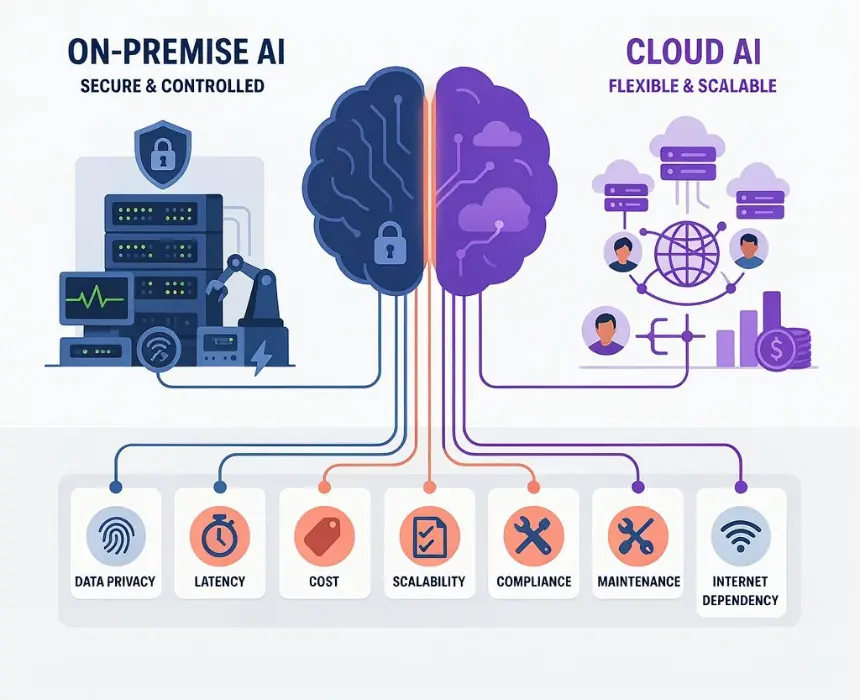
GPT-4 is powerful. It's also expensive, has API rate limits, and sends all your data to OpenAI's servers. For some use cases, that's fine. For others, it's a dealbreaker.
If you're building a customer support chatbot that handles 10,000 conversations per day, the cost difference between GPT-4 and Gemini Flash can be $3,000 per month. If you're processing legal documents with confidential client data, sending that to OpenAI's API might violate your compliance requirements. If you need to fine-tune a model on your proprietary training data, GPT-4 fine-tuning costs are 8× higher than GPT-3.5.
Choosing the right LLM isn't about picking the "best" one. It's about matching capabilities to your specific use case, budget, and deployment constraints. Let's break down what each model actually offers.
How Many Types of LLMs are Available in the Market?
Here's the 30-second read for each LLM before we go into details:
Commercial APIs (Pay Per Token)
GPT (OpenAI) : Most widely used. Strong reasoning, best plugin ecosystem, expensive at scale. Great for complex tasks where quality matters more than cost. Limited fine-tuning, API-only.
Claude (Anthropic) : Safety-focused. Excellent instruction-following, longer context windows, strong refusal handling. Mid-range pricing. Best for applications needing reliable responses without hallucinations. Limited fine-tuning, API-only.
Gemini (Google) : Cost-effective with deep Google ecosystem integration. Gemini Flash is incredibly cheap for high-volume workloads. Great for search integration, multimodal tasks. Some fine-tuning support, limited on-premise via Vertex AI.
Open-Source Models (Self-Hosted)
Llama (Meta) : Most popular open-source option. Llama 3.1 comes in 8B, 70B, 405B sizes. Free to use, runs anywhere. Quality approaches GPT-4 at larger sizes. You pay for compute/GPUs instead of API calls.
Mistral : European open-source alternative. Excellent quality-to-size ratio. Mistral Large (123B) competes with GPT-4. Strong for reasoning and coding. Commercial-friendly licensing.
Qwen (Alibaba) : Strong multilingual support, especially for Chinese. Qwen 2.5 series competes well with commercial models. Great for international applications. Less Western-centric training data.
Phi (Microsoft) : Small but capable. Phi-3 Medium (14B params) punches above its weight. Perfect for resource-constrained deployments. Runs on consumer hardware.
DeepSeek : Chinese model with strong coding capabilities. DeepSeek-V2 offers massive context windows (128k-256k tokens). Competitive reasoning performance. Good value for compute.
Deployment Platforms
Ollama : Run open-source models locally with one command. Dead simple for development and testing. Free, runs on your laptop or server. Perfect for getting started with self-hosted LLMs.
HuggingFace : Platform for finding, deploying, and hosting models. Inference API for quick testing. Can deploy any open-source model. Great ecosystem for experimentation.
Now let's get into the technical details that actually matter.
Cost Comparison of LLMs - Commercial APIs vs Self Hosted
Pricing isn't just API costs. For self-hosted models, you're paying for GPUs, infrastructure, and DevOps time. Here's the full picture:
Commercial API Pricing (Pay Per Token)
Model | Input Cost (Per 1M tokens) | Output Cost (Per 1M tokens) | Best use case |
|---|---|---|---|
GPT-4o | $2.50 | $10.00 | Complex reasoning, coding, analysis |
GPT-4o mini | $0.15 | $0.60 | High-volume simple tasks |
GPT-3.5 Turbo | $0.50 | $1.50 | Cost-sensitive applications |
Claude Opus 4 | $15.00 | $75.00 | Most complex tasks, best quality |
Claude Sonet 4 | $3.00 | $15.00 | Balanced performance/cost |
Claude Haiku 3 | $0.25 | $1.25 | Fast, cheap, high-volume |
Gemini 1.5 Pro | $1.25 | $5.00 | Multimodal, long context |
Gemini 1.5 Flash | $0.075 | $0.30 | Cheapest API option, high throughput |
Gemini 2.0 Flash | $0.10 | $0.40 | Latest fast model |
Self-Hosted Infrastructure Costs
For open-source models, you don't pay per token - you pay for compute infrastructure:
Model | Size | GPU requirements | Monthly AWS Cost | Monthly Azure Cost | Best for |
|---|---|---|---|---|---|
Llama 3.1 8B | 8B params | 1× L4 (24GB) | ~$300 | ~$280 | Development, testing, low-volume |
Llama 3.1 70B | 70B params | 2× A100 (80GB) | ~$2,400 | ~$2,200 | Production, good quality |
Llama 3.1 405B | 405B params | 8× A100 (80GB) | ~$9,600 | ~$8,800 | Best quality, high-cost |
Mistral 7B | 7B params | 1× L4 (24GB) | ~$300 | ~$280 | Cheap production option |
Mistral large | 123B params | 4× A100 (80GB) | ~$4,800 | ~$4,400 | Premium self-hosted |
Qwen 2.5 72B | 72B params | 2× A100 (80GB) | ~$2,400 | ~$2,200 | Multilingual applications |
Phi-3 Medium | 14B params | 1× A100 (40GB) | ~$1,200 | ~$1,100 | Resource-constrained |
Deepseek-V2 | 236B params | 4× A100 (80GB) | ~$4,800 | ~$4,400 | Long context, coding |
Note: These costs assume 24/7 GPU instances. You can reduce costs with:
Spot instances (50-70% discount, but can be interrupted)
Auto-scaling (spin down during low usage)
Quantization (4-bit models use 1/4 the memory)
Local deployment (one-time hardware cost instead of monthly cloud fees)
What This Means in Real Dollars
Let's compare API vs self-hosted for a customer support chatbot processing 100,000 queries per month:
Scenario: 500 input tokens + 300 output tokens per query
API Costs (Monthly):
GPT-4o: $425
Claude Haiku: $50
Gemini Flash: $12.75
Winner: Gemini Flash
Self-Hosted Costs (Monthly):
Llama 3.1 70B (2× A100): $2,400 in GPU costs
Can handle unlimited queries once deployed
Break-even at ~480,000 queries/month vs Gemini Flash
Break-even at ~56,000 queries/month vs GPT-4o
The crossover point: Self-hosted becomes cheaper than APIs when:
You exceed 50,000-100,000 queries/month (vs premium APIs)
You exceed 500,000+ queries/month (vs cheap APIs like Gemini Flash)
You have compliance requirements preventing API use
You need to fine-tune frequently (API fine-tuning costs add up)
Hidden Costs of Self-Hosting
Infrastructure cost isn't everything. Self-hosting adds:
DevOps overhead:
Setting up serving infrastructure (vLLM, TGI, Ollama)
Monitoring, logging, alerting
Security hardening
Model updates and version management
Estimate: 20-40 hours/month of engineer time = $4,000-$8,000/month
Performance optimization:
Prompt caching setup
Batch processing configuration
Quantization and optimization
Load balancing and scaling
One-time: 40-80 hours = $8,000-$16,000
Total Cost of Ownership for Self-Hosted Llama 70B:
GPU: $2,400/month
DevOps: $4,000-$8,000/month (varies by team efficiency)
Total: $6,400-$10,400/month
Compare to API:
At 100k queries/month: Gemini Flash = $13/month, GPT-4o = $425/month
At 1M queries/month: Gemini Flash = $128/month, GPT-4o = $4,250/month
Self-hosted makes financial sense when:
Volume exceeds 200k-300k queries/month on premium APIs
You already have ML infrastructure and DevOps expertise
Compliance prohibits external APIs
You need complete control over the model
Context Window: How Much Text Each Model Can Handle
Context window determines how much information the model can process in a single request. This matters for processing long documents, maintaining conversation history, and code analysis.
Commercial API Models
Model | Context window | What this handles |
|---|---|---|
GPT-4o | 128,000 tokens | ~300 pages of text |
GPT-40 mini | 128,000 tokens | ~300 pages of text |
GPT-3.5 Turbo | 16,000 tokens | ~40 pages of text |
Claude Opus 4 | 200,000 tokens | ~500 pages of text |
Claude Sonet 4 | 200,000 tokens | ~500 pages of text |
Claude Haiku 3 | 200,000 tokens | ~500 pages of text |
Gemini 1.5 Pro | 2,000,000 tokens | ~5,000 pages of text |
Gemini 1.5 Flash | 1,000,000 tokens | ~2,500 pages of text |
Gemini 2.0 Flash | 1,000,000 tokens | ~2,500 pages of text |
Open-Source Models
Model | Context window | What this handles | Notes |
|---|---|---|---|
Llama 3.1 8B | 128,000 tokens | ~300 pages of text | Matches GPT-4o |
Llama 3.1 70B | 128,000 tokens | ~300 pages of text | Matches GPT-4o |
Llama 3.1 405B | 128,000 tokens | ~300 pages of text | Matches GPT-4o |
Mistral 7B | 32,000 tokens | ~80 pages of text | Good for most tasks |
Mistral Large | 128,000 tokens | ~300 pages of text | Matches GPT-4o |
Qwen 2.5 72B | 128,000 tokens | ~300 pages of text | Extended context support |
Phi-3 Medium | 128,000 tokens | ~300 pages of text | Impressive for size |
Deepseek-V2 | 128,000 tokens | ~300 pages of text | Some configs support 256k |
Yi 34B | 200,000 tokens | ~500 pages of text | Matches Claude |
When Context Window Actually Matters
Long document analysis: If you're analyzing entire codebases, legal contracts, or research papers, Gemini's 2M token window lets you feed everything in one request. GPT-4o's 128k limit means you'd need to chunk and summarize.
Conversation memory: For chatbots that need long conversation histories, bigger context windows help. But every token in context costs money on every API call—keeping 100k tokens in context on GPT-4o costs $0.25 per request just for the context.
RAG vs long context: Most applications use RAG (Retrieval-Augmented Generation) instead of massive context windows. Rather than putting 1,000 pages in context, you retrieve the 3 most relevant pages and only include those. This is cheaper and often more effective.
Self-hosted advantage: With self-hosted models, context doesn't cost extra per request. Once the GPU is running, using 128k tokens costs the same as using 2k tokens. This makes long-context applications more economical on self-hosted setups.
Quality Comparison: What Each Model Does Well
Commercial APIs
GPT-4o: Best complex reasoning, coding, math. Moderate hallucinations. $425/month for 100k queries.
Claude Sonnet: Best instruction-following. Lower hallucinations. Helpful but sometimes overly cautious. $600/month for 100k queries.
Gemini Flash: Fast and cheap. Good for simple tasks. More hallucinations than GPT/Claude. $13/month for 100k queries.
Open-Source Models
Llama 405B: ~85% of GPT-4 quality. Expensive to run ($10k/month cloud). Best self-hosted option for quality.
Llama 70B: ~70% of GPT-4 quality. Sweet spot for production self-hosting. $2,400/month cloud or $30k one-time.
Llama 8B: ~40-50% of GPT-4 quality. Great for simple tasks. Runs on consumer hardware. $300/month cloud or $3k one-time.
Reality: For simple tasks (classification, basic Q&A), Llama 8B performs nearly as well as GPT-4o. For complex reasoning, GPT-4o and Claude Opus pull ahead.
How to Actually Decide Which LLM to Choose
Step 1: Can You Use External APIs?
No (compliance/privacy):
→ Self-hosted only. Start with Llama 70B.
Yes:
→ Continue to Step 2.
Step 2: What's Your Volume?
<100k queries/month:
→ Use APIs. Gemini Flash or GPT-4o mini.
100k-500k queries/month:
→ Test both. APIs probably still cheaper.
>500k queries/month:
→ Self-hosted becomes cost-effective. Llama 70B.
Step 3: Test With Real Data
Don't trust benchmarks. Test with 50-100 real examples:
Define success criteria (accuracy, tone, format)
Test 3-4 options (Gemini Flash, GPT-4o mini, Llama 8B, Llama 70B)
Measure quality (human ratings) and cost (actual tokens/GPU time)
Pick cheapest option that meets quality bar
Step 4: Start Small, Iterate
Recommended path:
Test locally:
ollama run llama3.1:8b(free)If quality good → deploy Llama 8B to production
If quality insufficient → try Llama 70B or test APIs
Measure cost and quality in production
Switch if needed
The Bottom Line
If you can't use external APIs:
Self-hosted is your only option. Start with Llama 70B ($2,400/month cloud or $30k one-time).
If volume is <100k queries/month:
Use Gemini Flash ($13/month). Test quality. Upgrade to GPT-4o mini if needed. Don't self-host yet.
If volume is 100k-500k queries/month:
Model both. Gemini Flash costs ~$130/month. Llama 70B costs $2,400/month (unlimited). Self-hosting breaks even around 200k queries/month.
If volume is >500k queries/month:
Self-hosted is almost always cheaper. Llama 70B for most apps, Llama 405B if you need best quality.
For complex reasoning where quality matters most:
GPT-4o (API) or Llama 405B (self-hosted).
The pragmatic path:
Start with Ollama + Llama 8B on your laptop (free)
Test with real use case
If good → deploy to production
If not → try Llama 70B or APIs
Measure and iterate
Don't waste weeks evaluating. Pick one, ship it, measure, iterate. The "best" LLM is the one that meets your quality bar at a cost that works—whether that's a $13/month API or a $30k GPU cluster.
If you're building AI features and need help choosing the right LLM architecture or deployment strategy—CoreFragment's AI team has built production applications using both commercial APIs and self-hosted models. We can review your use case and recommend what actually fits your requirements and budget.
Author
Have Something on Your Mind? Contact Us : info@corefragment.com or +91 79 4007 1108

Related articles