- August 20, 2026
Summarize with AI
Not enough time? Get the key points instantly.
Get summary:
Why Switching RTOS is Hard?
A firmware team decides to move an existing product from FreeRTOS to Zephyr (both are operating systems for small devices), expecting a simple swap since "it's all just C code underneath." Three weeks in, the way tasks run doesn't match up cleanly, half the code that talks to the hardware needs rewriting under a new setup system, and the Bluetooth software the product depended on doesn't work the same way in the new environment at all. Migration from FreeRTOS to Zephyr is a real change to how the whole system is built, not a quick swap, and treating it like a quick swap is exactly what turns a planned two-month project into a six-month one. This post covers the real risks involved and how to handle each before they blow up your schedule.
Why FreeRTOS to Zephyr Migrations Go Over Budget
FreeRTOS and Zephyr solve similar problems in very different ways. FreeRTOS is a small, lean scheduler that leaves almost everything else - the code that talks to hardware, the setup files, the build tools up to the chip maker's kit or the team's own code. Zephyr is a full platform with its own way of talking to hardware, its own way of describing the hardware (called a device tree), its own build tools, and its own way of doing almost everything a FreeRTOS project usually builds by hand.
That difference is exactly why these projects run over budget. A team that only plans for "moving the app code over" misses the real work: rebuilding how tasks run, rebuilding how hardware is set up, changing how the whole project gets built, and if the product uses Bluetooth - rebuilding the wireless software itself. Naming these risks clearly before starting is what keeps a project on schedule instead of finding each one halfway through.
Migration From FreeRTOS to Zephyr: 7 Risks and Fixes
Risk 1: The Way Tasks Run Doesn't Match Up
FreeRTOS task to Zephyr thread conversion isn't just a rename. FreeRTOS "tasks" and Zephyr "threads" both mean roughly the same thing — a piece of code running on its own but the way they're scheduled, the priority numbering, and the tools used to coordinate between them are different enough that copying code over line by line can quietly cause bugs, like tasks running in the wrong order or missing a deadline, that don't show up until the device is actually in use.
What | FreeRTOS | Zephyr |
|---|---|---|
Priority numbers | Higher number = higher priority (can be changed) | Lower number = higher priority with two different priority ranges |
How work gets scheduled | Based on priority, can interrupt lower priority work | Similar, but with more options for how tasks share time |
Talking between hardware interrupts and tasks | Queues, signals, direct messages | Similar tools, but a different way of using them |
Fix: Don't copy tasks over one by one. Rebuild the priority order on purpose to match how Zephyr expects it, and treat the hardware-to-task signaling as something to redesign, not just retype - this is where small, hard-to-catch timing bugs tend to hide if you rush it.
Risk 2: The Way Hardware Gets Set Up Changes Completely
Zephyr device tree vs FreeRTOS board config is one of the hardest parts to learn, because FreeRTOS projects usually set up hardware through code written by the chip maker plus regular code files, while Zephyr describes hardware in a separate, structured format called a device tree, plus a settings system called Kconfig. A team that's never used a device tree before which is common, since it's more familiar to Linux developers than to FreeRTOS developers needs real time to learn this, not just a quick look at the docs.
Fix: Set aside real learning time for the device tree and settings system before you start moving code over, and start from an existing, supported board close to your own hardware instead of writing your hardware description completely from scratch.
Risk 3: The Hardware-Talking Code Needs Real Rework, Not Just a Recompile
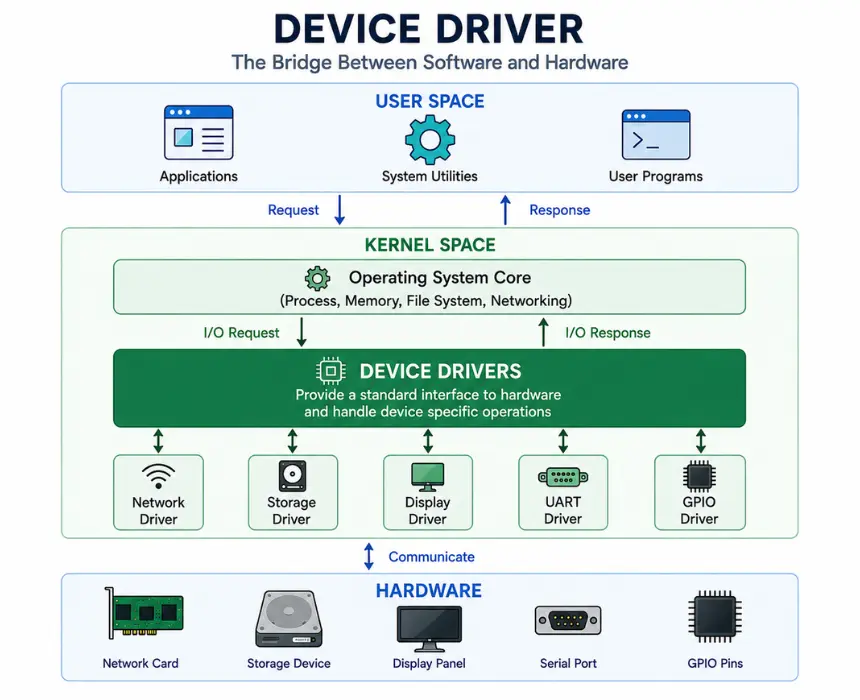
FreeRTOS to Zephyr driver migration is rarely just "recompile the existing code with a new setup." Zephyr expects the code that talks to each piece of hardware to follow its own structure and to be linked to the hardware through the device tree, which means code written directly against a chip maker's toolkit under FreeRTOS usually needs to be restructured, not just moved over.
Check if Zephyr already has support for your hardware before writing your own - a lot of common chips and sensors are already supported, and writing it again wastes time
Plan real engineering time for anything custom, not a quick pass, since the whole structure is different, not just the function names
Test on real hardware early, since problems with how the device tree links to the hardware often only show up once the board actually starts up
Risk 4: The Bluetooth Software Isn't a Simple Swap
FreeRTOS to Zephyr BLE stack migration is one of the riskiest parts of moving a Bluetooth product, because most FreeRTOS-based Bluetooth products use a chip maker's own Bluetooth software (like Nordic's SoftDevice) with its own way of doing things, while Zephyr comes with its own built-in Bluetooth software that works completely differently. This isn't a settings change - it's closer to rewriting the whole Bluetooth part of the app.
Fix: Treat the Bluetooth move as its own separate project with its own timeline, not a line item inside the general move. Test the core Bluetooth behavior (advertising itself, handling connections, sharing data) early on real devices, since Bluetooth problems tend to show up as connection reliability issues that are expensive to track down later.
Risk 5: The Tools Your Team Uses to Build the Project Change
Most FreeRTOS projects get built through a chip maker's own app or a familiar set of build files. Zephyr uses its own build system, called West (built on top of a tool called CMake), with its own project layout and its own settings system. This is a real change in tools that the whole team has to get used to, not just whoever is doing the actual code move.
Part | Typical FreeRTOS Setup | Zephyr |
|---|---|---|
Build tool | Chip maker's app or standard build files | West (built on CMake) |
Settings | Code files, chip maker's settings | Kconfig, device tree |
Project layout | Often set by the chip maker's kit, varies | A standard Zephyr layout |
Fix: Get at least one person on the team comfortable with Zephyr's build tools before the real work starts, and count that learning time as part of the project schedule instead of assuming the team will pick it up along the way.
Risk 6: The Device Can End Up Using More Memory
Zephyr's flexibility comes from having a lot of optional pieces built in, and a build left at default settings can end up using more flash and RAM than a lean, hand-tuned FreeRTOS project did a real problem if your hardware was chosen with the old, smaller footprint in mind.
Setup Approach | Typical Effect on Memory Use | Effort |
|---|---|---|
Default settings | Larger — many optional pieces turned on by default | Low — works right away |
Settings tuned for your product | Close to what a lean FreeRTOS build used | Higher — takes deliberate trimming |
Fix: Treat trimming down the settings as a real task with its own time on the schedule:
Turn off pieces you don't use — Zephyr turns on a lot by default that most products don't need
Turn down logging for the final product build, since detailed logging uses real memory
Re-check memory use after each round of trimming, not just once at the end, so problems get caught early instead of right before launch
Risk 7: Hard-to-Spot Bugs Hide in Timing, Not Logic
Risks of migrating RTOS mid-product show up most in code where timing matters, because the app logic often moves over fine while the underlying scheduling behaves just differently enough to cause race conditions or missed deadlines that don't show up in normal testing. A feature that worked fine under FreeRTOS's exact scheduling behavior can act differently under Zephyr's, even with code that looks functionally the same.
Fix: Put extra testing effort into timing-sensitive code - handling hardware interrupts, real-time control loops, anything with a hard deadline instead of just checking that features "still work" in a basic sense. This is where a move that looks finished in a demo can turn out to have a real bug once it's running in the real world.
Checklist: Planning a FreeRTOS to Zephyr Migration Realistically
A migration from FreeRTOS to Zephyr is planned realistically when you can answer all of these before committing to a timeline:
Has the priority and task-scheduling setup been rebuilt on purpose, not just copied over line by line?
Does the team actually know the device tree and settings system, or is that learning time built into the schedule?
Which hardware-talking code already exists in Zephyr, and which genuinely needs to be rebuilt?
If Bluetooth is involved, is it planned as its own separate project with its own timeline?
Has someone on the team gotten hands-on with Zephyr's build tools before the real work starts?
Is there time set aside to trim memory use back down on hardware with tight limits?
Is timing-sensitive code getting real, dedicated testing, not just a basic check that it "still works"?
Plan It as a Redesign, Not a Swap
Migration from FreeRTOS to Zephyr goes well when it's planned as a real change to the system - how tasks run, how hardware is set up, how the project gets built, and the Bluetooth software are all genuinely different — instead of being treated like swapping one simple part for another. Teams that plan a migration from FreeRTOS to Zephyr around these specific risks up front stay close to their original schedule; teams that treat it as "just changing the operating system" tend to find the real scope one risk at a time, partway through the project.
If you're planning a move from FreeRTOS to Zephyr and want a second opinion on the scope and risks before committing to a timeline, CoreFragment's firmware team can look at your product and flag what's likely to take longer than expected.
Author
Have Something on Your Mind? Contact Us : info@corefragment.com or +91 79 4007 1108

Related articles