- September 04, 2024
Summarize with AI
Not enough time? Get the key points instantly.
Get summary:
Why Voice AI Integration With IoT Firmware Is Important Concept of Product Development?
Your hardware prototype is running. The MCU is chosen, the radio stack is working, and the product team has just added one requirement to the spec: voice control. Getting voice AI IoT firmware right, they say, should not be that hard.
That sounds straightforward. Add a microphone, drop in a wake word SDK, wire it to your command handler. Two weeks of work, maybe three. Except the first time you test it in a room with background noise, half the wake words get missed. The ones that do trigger fire off a processing spike that starves your BLE stack. Your battery life estimate drops by 40%. And the SDK you chose only runs on the evaluation board's pinout. Not yours.
Voice AI IoT firmware integration is one of the most underestimated parts of connected product development. This post walks you through the full stack: microphone selection, audio preprocessing, wake word and command recognition, RTOS task structure, power management, and the cloud-versus-edge decision that shapes everything else. By the end, you will know exactly how to structure the IoT voice interface design and firmware before you write a line of it.
Why Voice AI Integration in IoT Firmware Is Harder Than the SDK Demo Suggests
Every voice AI SDK ships with a demo that works. The demo runs on the vendor's evaluation board, in a quiet room, with a microphone placed 30 centimeters from the speaker's mouth. Your product ships in a kitchen, a factory floor, a hospital ward, or a vehicle. None of those environments look like that demo.
The gap between a working demo and a shipping product is where most IoT voice integration projects lose weeks. The problems are almost never in the AI model itself. They are in the layers around it: the audio pipeline that feeds the model, the task structure that runs alongside it, the power management that keeps the device alive between voice events, and hardware choices that were locked before anyone thought about audio quality.
Here is what voice AI IoT firmware integration touches across your product:
Hardware: which microphone you use, how it connects to the chip, where it sits on the board
Audio capture: how raw sound gets from the microphone into a buffer the software can read
Preprocessing: filtering out background noise and detecting when a human is actually speaking
AI inference: the engine that recognises the wake word and understands the command
Application logic: what happens after a command is recognised — routing, error handling, fallbacks
Power management: how the always-on audio system coexists with your battery budget
Skipping decisions at any layer causes problems that show up in the layer above it. A poorly set up audio buffer creates distortion that the noise filter cannot clean. A noise filter running at the wrong speed feeds garbled audio to the AI engine. The AI engine then starts triggering randomly. Your product wakes up by itself at 3am. None of that is a model problem. All of it is a firmware problem.
Layer 1: Microphone Selection - The Decision That Shapes Everything Below It
Most firmware engineers inherit the microphone choice from the hardware team and only discover the implications when the audio pipeline does not work. Microphone selection affects how complex your audio processing needs to be, how much CPU it consumes, and how good the signal quality is going in. Choose the wrong one and no amount of software work recovers the loss.
PDM vs I2S: How Your Microphone Connects to the Chip
There are two common ways a digital microphone sends audio to your chip: PDM and I2S.
PDM microphones (like the STMicroelectronics MP34DT01 or Knowles SPH0641LU4H-1) send a very fast stream of single-bit values. The chip has to convert that stream into usable audio samples before processing can begin. On chips with built-in hardware for this conversion (Nordic nRF52840, STM32L4+), it happens automatically at no CPU cost. On chips without it, the firmware has to do the conversion in software, and that takes CPU time away from everything else the device is trying to do.
I2S microphones (like the Knowles SPH0645LM4H or ICS-43434) send audio that is already in a usable format. No conversion step needed. They require a couple of extra signal lines on the board, but they simplify the firmware significantly and free up CPU for the processing that actually matters.
The practical rule: if your chip has built-in PDM conversion, use a PDM microphone. It is cheaper and simpler. If it does not, use I2S and save the processing power for your audio pipeline.
Where the Microphone Lives on the Board Matters More Than Most Teams Expect
A microphone that is placed in the wrong spot causes more voice AI failures than any software bug. Before the board layout is finalised, make sure:
The microphone is on the edge of the board, facing the direction speech will come from.
The acoustic opening (the small hole the sound travels through) has nothing blocking it within 2mm.
If the device has a speaker, the microphone is at least 50mm away from it on a different acoustic path — otherwise the device may hear its own output and trigger itself.
For outdoor or industrial products, a waterproof acoustic membrane covers the opening. Just confirm the membrane passes the frequencies your voice model needs before locking the spec.
Layer 2: Audio Preprocessing - Cleaning the Signal Before the AI Sees It
The audio coming straight from the microphone is not ready for a voice AI model. Integrating speech recognition into an IoT product means more than pointing a microphone at the AI engine. The raw audio contains background noise, echoes from speakers, and long stretches of silence where nothing is happening. Running AI inference on all of that wastes power and produces unreliable results. Three preprocessing steps clean the signal before it reaches the model.
Step 1: Voice Activity Detection - Only Process Audio When Someone Is Actually Speaking
Voice Activity Detection (VAD) is a lightweight filter that sits in front of the main AI engine. Its only job is to decide whether the current audio contains a human voice. When it does, it passes audio to the inference engine. When it does not, the inference engine stays off.
Without VAD, your AI engine runs continuously, processing every frame of audio whether anyone is speaking or not. That burns through battery and CPU constantly. With a good VAD, the AI only runs when it has something worth listening to.
A basic VAD simply checks whether the audio is loud enough. That works in a quiet office but fires constantly in a factory or kitchen because machines are loud too. For real-world products, use a trained VAD — one that has learned what human speech actually sounds like, not just how loud it is. Picovoice's Cobra and Silero VAD both work well on common IoT chips (Cortex-M4 class). They catch speech accurately in noisy environments without wasting resources on non-speech sounds.
Step 2: Noise Reduction and Echo Cancellation - Cleaning Up What Gets Through
Once VAD confirms that someone is speaking, noise reduction removes background sounds before the audio reaches the AI model. The simplest approach estimates the constant background noise (HVAC hum, motor noise) during silence, then subtracts it from speech frames. This works well for steady noise but struggles with unpredictable sounds like footsteps or other voices.
For products that also have a speaker (devices that play prompts, confirmations, or audio feedback), echo cancellation is essential. Without it, the microphone picks up the device's own speaker output and can accidentally re-trigger the wake word. Echo cancellation works by comparing the microphone input against what the speaker just played and removing that component from the audio. Implementing this well on a small chip is genuinely difficult. If your product has a speaker, budget for a hardware solution (a dedicated audio processor like the XMOS xCORE or Knowles IA8201) or a pre-built software library matched to your chip.
Step 3: Feature Extraction - Converting Audio Into a Form the Model Understands
Voice AI models do not work directly on raw audio waveforms. They work on a compact mathematical representation of the audio, typically something called Mel-frequency cepstral coefficients (MFCCs). Think of it as a fingerprint of the sound that captures the information a model needs to recognise speech while ignoring the details that do not matter.
Your firmware computes this representation from the audio before passing anything to the model. The computation runs fast enough on a chip with a hardware maths unit (Cortex-M4F with FPU), typically 2–4ms for each 25ms slice of audio. On smaller chips without this hardware, it is not fast enough at real-time and you will need a co-processor.
One critical detail: the settings used for this computation (frame size, number of frequency bands, and similar parameters) must exactly match the settings used when the model was trained. A mismatch silently degrades recognition accuracy. These settings do not get changed after the model is trained.
Layer 3: Wake Word and Command Recognition - Choosing the Right Engine
This is where most teams start. It is actually the middle of the stack. Starting here, before sorting out the layers below, is the most common reason voice AI projects get stuck.
The Three Main SDK Options for IoT Devices
Picovoice Porcupine (wake word) + Rhino (commands): The most practical choice for most IoT projects on ARM Cortex-M4 class chips and above. Porcupine listens for your wake word. Rhino handles what comes after — it understands natural commands like "set temperature to 22 degrees," not just simple keyword matches. Both run entirely on-device with no internet connection required. You can create custom wake words through their self-service tool without needing to train a model from scratch. Licensing is per shipped device.
Sensory TrulyHandsfree: The best option for genuinely noisy environments — factory floors, kitchens, outdoor settings. Its acoustic models are specifically designed to maintain accuracy when background noise is high. The trade-off is that there is no self-service option; licensing requires a direct commercial agreement with Sensory. If your product needs to work reliably in environments below a 10dB signal-to-noise ratio (where noise is nearly as loud as speech), Sensory is worth the process.
Espressif ESP-SR: Free and open-source, designed for the ESP32-S3 chip. If your product is already built on the ESP32 platform and cost is a priority, ESP-SR is a reasonable starting point for prototypes. The out-of-the-box accuracy for custom wake words is lower than Picovoice or Sensory unless you go through the extra step of training a custom model with their WakeNet tool — which adds 2–3 weeks.
Tuning the Sensitivity - Fewer False Triggers vs Fewer Missed Commands
Every wake word engine outputs a confidence score with each detection. Your firmware uses a threshold to decide: above this score, the wake word fired; below it, ignore. Getting this threshold right for your deployment environment is one of the most important steps before shipping.
Set it too low and the device triggers on similar-sounding words, background conversation, or TV audio. Set it too high and it misses legitimate wake attempts. The right value is different for a quiet home versus a noisy workshop versus a medical environment where false triggers are safety-critical.
Always test and tune the threshold in your actual deployment environment, not in a quiet office. A value that works perfectly in the lab can behave completely differently on a factory floor. Log triggering events during testing. You will quickly spot patterns that need adjusting.
One often-skipped detail: give the user a short window (1.5–2 seconds) to speak a command after the wake word triggers before the device times out and resets. Log how often that window expires without a command. A high timeout rate usually means the wake word is firing on non-speech sounds, not that users are slow to respond.
Layer 4: Task Structure - Running Voice AI Without Disrupting Everything Else
Voice AI processing cannot take over the device. It has to run alongside your Bluetooth or Wi-Fi stack, your sensor readings, and your display updates. On a single-core embedded chip, this requires a deliberate task structure.
How to Assign Priorities to Voice-Related Tasks
A voice AI firmware stack needs several separate tasks running at different priority levels:
Task | Priority | Memory Needed | What It Does |
|---|---|---|---|
Audio capture (hardware interrupt) | Highest | Minimal | Moves audio from microphone to buffer immediately. Cannot be delayed. |
Noise filtering and preprocessing | High | 4-8 KB | Reads raw audio, prepares it for the AI engine |
AI inference (wake word and command) | Medium-High | 8-16 KB | The most memory-intensive part |
Command handler | Medium | 2-4 KB | Takes the recognised command and routes it to the right place |
Communication stack (BLE / Wi-Fi) | Medium | 4-8 KB | Must not be blocked by voice processing |
Application logic | Low–Medium | 4-8 KB | UI updates, state management |
Power management | Low | 2-4 KB | Decides when to sleep |
The most common mistake is giving the AI inference task the highest priority because it feels the most important. It is not. Audio capture must be the highest priority task because if a chunk of audio is missed, it is gone forever and the model gets corrupted input. The AI engine can wait 10–20ms between audio frames without any problem. The audio capture cannot wait at all.
The standard approach for reliable audio capture uses two buffers of equal size. While the hardware fills one with fresh audio, the preprocessing task reads from the other. Then they swap. This means the hardware and the software never compete for the same buffer at the same time.
Conflicts With the Wireless Stack
The most common integration problems happen when voice AI and Bluetooth or Wi-Fi share resources they were not designed to share:
Shared communication buses: If your microphone shares a data bus with a display or sensor, the bus arbitration during audio capture can create gaps in the audio. Give the microphone its own dedicated connection if possible.
CPU timing conflicts: On the nRF52840, Bluetooth connection events run at high priority in a software interrupt. If your AI inference task runs at a similar priority, they can collide. Profile this with Nordic's Power Profiler Kit 2 before calling the integration done.
Shared clock sources: Some chips use the same internal clock for both audio timing and wireless radio timing. When the wireless stack adjusts the clock during a connection event, the audio sample rate shifts — which corrupts the audio representation the model depends on. Check your chip's clock configuration early in the design process.
Layer 5: Cloud vs On-Device Processing - The Architecture Decision That Locks Everything
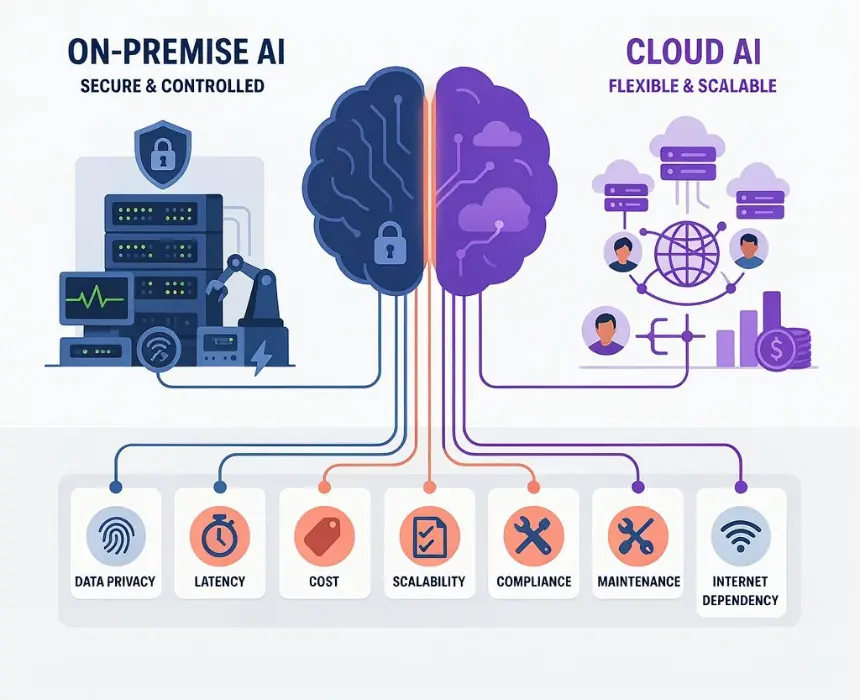
Most teams treat this as a preference. It is not. The decision between running voice AI on the device versus sending audio to the cloud determines your response speed, your battery life, whether the product works without internet, your data privacy obligations, and your ongoing infrastructure cost.
When On-Device Processing Is the Right Choice
Run everything on the device when:
The product must work without internet. Remote industrial sites, underground facilities, rural markets with poor connectivity — if your product cannot afford to depend on a network connection, cloud processing is a risk, not a feature.
Voice AI latency in IoT devices must feel instant. Sending audio to a cloud server and waiting for a response takes 400–800ms under good conditions. For anything that needs to feel responsive - controlling lights, operating machinery, responding in a medical setting - that delay is noticeable and often unacceptable. On-device processing responds in 50–150ms.
Audio privacy matters. Every cloud voice request means audio leaves the device. For medical products (subject to HIPAA), European products (GDPR), or any product where users expect their voice data to stay private, on-device processing removes this concern entirely.
Battery life is critical. Sending each voice command over a radio connection (especially on NB-IoT or Wi-Fi) costs significant energy. For battery-powered products with frequent voice interactions, that cost adds up quickly and shortens device life noticeably.
When Cloud Processing Makes Sense
Send audio to the cloud when:
You need to understand complex, natural language. On-device engines handle simple, predefined commands well. "Turn on the lights" is easy. "Turn on the kitchen lights, leave the living room off, and set everything to 50 percent brightness in ten minutes" requires language understanding that does not fit inside a small chip. Cloud-based language models handle this well.
The device is plugged in and always connected. If power is unlimited and the internet is always available, the energy cost of cloud requests does not matter. Invest in better language understanding instead.
You want to improve the product without updating firmware. Cloud models can be retrained and updated without pushing changes to every device in the field. For large deployments, this is a meaningful operational advantage.
The Hybrid Approach Most Production Products Use
Most shipping voice AI IoT firmware products use a combination of both:
Wake word detection runs on the device, always listening, using very little power.
When the wake word triggers, the device captures 1–3 seconds of follow-on audio.
That audio is sent to a cloud service that understands natural language.
The cloud sends back a structured command: what action to take and with what parameters.
The device executes the command locally.
This gives you the battery efficiency of on-device wake word detection, the language understanding quality of a cloud model, and a fallback: if the cloud is unreachable, a set of simple commands can still be handled on-device.
Common Questions About Voice AI IoT Firmware
How much storage and memory does a typical voice AI stack need on a small IoT chip?
A Picovoice Porcupine wake word model needs roughly 500KB of program storage and 100KB of working memory on a Cortex-M4 chip. Adding Rhino for command understanding adds another 400KB of storage and 50KB of memory. The audio processing pipeline adds about 20KB on top of that. In total, a minimal wake-word-plus-command setup needs under 1MB of storage and under 256KB of working memory. That fits on the Nordic nRF52840 alongside a Bluetooth stack and application code, but it is tight. If your application logic is substantial, the STM32H7 or nRF5340 gives you more room.
Can voice AI run on very small, low-cost chips like the Cortex-M0?
Not in practice. Cortex-M0 and M0+ chips lack the hardware maths accelerator needed to process audio fast enough for real-time voice recognition. The minimum is Cortex-M4F. If your product is built around a smaller chip, the most practical path is a two-chip design: your existing chip handles connectivity and application logic, while a second, slightly more capable chip (like the STM32G4 or nRF52832) handles audio capture and AI inference, passing results back over a simple serial connection.
What audio settings should I use for voice AI on an IoT device?
Use 16kHz sample rate and 16-bit depth. This is the standard that Picovoice, Sensory, and most open-source voice models are trained on. Higher sample rates (48kHz) waste processing power without improving speech recognition. Human voice is concentrated in frequency ranges well below what higher sample rates add. Lower rates (8kHz) cause the model to miss fine details in consonants. Stick with 16kHz unless your SDK documentation says otherwise, and do not change it after the model is trained.
How do I reduce false wake word triggers in a noisy environment?
Three approaches, in order of effectiveness. First, raise the confidence threshold. The device will miss some genuine wake word attempts, but false triggers will drop significantly. Second, add a second lightweight check after the primary wake word engine fires before committing to the command pipeline. Third, improve the audio quality going into the model: consider a two-microphone beamforming setup, improve the noise filter, or add echo cancellation if speaker output is triggering false wakes. If none of these is enough, the model itself needs to be retrained on audio recorded in your actual deployment environment. Models trained only in quiet conditions consistently underperform in noisy ones.
How does always-on voice listening affect battery life on a BLE product?
The always-on audio pipeline is the main battery cost. A single microphone running continuously on an nRF52840 draws roughly 0.5–1mA. Add a VAD running on-chip and you are looking at 1–2.5mA total for the always-on voice layer. On a 500mAh battery, that supports 200–500 hours of continuous listening, roughly 8–20 days. For products that need longer battery life, the common approach is to duty-cycle: the microphone and VAD run for a short window every second or two, with the chip in deep sleep in between. Some wake words will be missed during the sleep window. That is the trade-off.
How should the voice interaction state machine be structured?
Define four clear states: IDLE (chip mostly asleep, no audio processing), LISTENING (VAD running, AI engine waiting for a wake word), COMMAND (wake word received, capturing and recognising the follow-on command), and RESPONDING (command understood, action executing, audio prompt playing if applicable). Every voice interaction moves through this sequence. Each state should have a time limit. If no command follows the wake word within 2 seconds, return to LISTENING. If LISTENING receives no wake event within a set timeout, drop back to IDLE. Log every state change during development. State machine bugs are the hardest voice AI firmware problems to reproduce later.
Start With the Audio, Not the SDK
The most common mistake in voice AI IoT firmware projects is starting with the SDK. Engineers get the demo working, feel confident, and keep building. Then they discover three weeks later that the microphone placement, audio capture setup, or task structure does not actually support the quality the model needs. By that point, the SDK is woven into everything and unpicking the layers underneath is painful.
Start with the audio pipeline. Get clean audio from your microphone into a buffer, with the preprocessing running correctly, before you touch the AI engine at all. Validate the audio quality first. Once you know the input is clean, SDK integration is fast and predictable. Once the input is broken, no SDK fixes it.
CoreFragment's embedded firmware team has built voice AI stacks for consumer wearables, industrial IoT terminals, and medical monitoring devices. If you are scoping voice integration for an IoT product and want a technical review of your architecture before you build it, reach out. That conversation is usually 45 minutes and saves weeks.
Author
Have Something on Your Mind? Contact Us : info@corefragment.com or +91 79 4007 1108

Related articles